Restaurant promotions that do not eat into your margin
A restaurant promotion should not automatically mean “20% off everything”. This kind of discount is easy to launch, but it can just as easily reduce the margin on orders guests would have placed anyway at full price. If it appears regularly, some customers may also start postponing purchases and waiting for the next promotion.
A better promotion has a specific goal: filling quieter hours, encouraging a first order through your own website, increasing basket value, promoting a new dish or encouraging the guest to choose a meal deal instead of a single item.
So first decide what you want to change. Only then choose a discount, freebie or code.
Why a discount on everything is tempting but risky
A fixed percentage discount is easy to communicate. The guest sees a simple message and the restaurant does not need to create complicated rules.
The problem is that the discount reduces the value of the whole order, including when the customer would have bought the product at the normal price anyway.
If the promotion covers the entire menu, it can also:
- reduce the margin on your best-selling dishes,
- make it harder to assess whether the order was actually generated by the promotion,
- train guests to buy only when there is a discount,
- apply during your busiest hours, when you do not need additional demand.
That is why, before launching any campaign, it is worth defining not only the size of the discount but also its scope, duration, channel and conditions.
Start with the goal of the promotion
A promotion without a goal is simply a price reduction. A promotion with a goal can be a tool for influencing a specific customer behaviour.
Filling quieter hours
If you have plenty of empty tables or few online orders between 2:00 pm and 4:00 pm, you can create an offer available only during that period.
There is then no reason for the same discount to apply at 7:00 pm on a Friday when the kitchen is already at full capacity.
Moving guests to your own channel
You can create a code available only for a guest’s first order through your own website.
Such a code has a clear purpose: encouraging someone who already knows your restaurant to use the direct channel next time.
You can read more about this approach in our article on delivery app commissions versus your own online ordering.
Increasing basket value
Instead of offering a discount with no conditions, you can link the promotion to a minimum order value.
For example, the guest receives free delivery or a free product after reaching a certain threshold. The promotion then encourages a larger basket rather than simply reducing the price of products they had already chosen.
Promoting a new dish
If you are introducing a new menu item, you can use a promotion to encourage guests to try it.
You do not need to discount the entire menu. You can create a meal deal or add a specific product as a bonus once a condition is met.
A free product may cost less than a discount with the same perceived value
It is worth distinguishing between the selling price of a product and its cost to the restaurant.
A guest may place a high value on a product that costs the restaurant much less than its menu price. This means a freebie can be attractive to the guest while costing you less than a discount on the whole order.
Example calculation
For illustration only, suppose the average order value is 55 PLN.
The restaurant wants to encourage the guest to spend more than 70 PLN and offers a free product once that threshold is reached.
Suppose that:
- the free product costs the restaurant 4 PLN,
- the guest increases the basket from 55 PLN to 72 PLN to meet the condition.
In this example, the basket value increases by:
72 PLN - 55 PLN = 17 PLN
The example cost of the bonus is 4 PLN.
Of course, this does not automatically mean 13 PLN of additional profit, because the extra products also involve ingredient and labour costs. The calculation does, however, show why it is worth comparing the cost of a specific reward with a discount applied to the whole order.
If a large percentage discount were applied to the full 72 PLN instead of offering a freebie, the promotion could cost the restaurant more.
“Buy X, get Y” works well for specific products
A “2+1” or “buy X, get Y” mechanic gives you more control than a discount on everything.
You can use it, for example, to:
- offer a third drink when two are ordered,
- add a specific product to a meal deal,
- support a selected category,
- promote an item that pairs well with a main dish.
The key is to calculate the cost of the products included in the promotion.
If the free item is the most expensive product in the category, the financial effect can be very different from a promotion where the discount applies to the cheapest item.
Watch out for repeated applications
With a “buy X, get Y” mechanic, decide what should happen with a larger order.
If the guest buys six products, should the promotion apply once or twice? Both options can be valid, but they should be configured deliberately.
It is also worth setting a maximum number of applications within a single order.
Free delivery should have a condition
Free delivery sounds attractive in marketing, but delivery still generates a cost for the restaurant. Someone has to spend time, use fuel and deliver the order.
That is why it is better to link free delivery to:
- a minimum basket value,
- a specific code,
- a defined time period,
- a selected sales channel.
For example, instead of offering free delivery on every order, you can make it available only above a value that makes economic sense for your delivery operation.
Discount codes help measure the source of a promotion
A code is not only a way to apply a discount. It can also be a simple tool for checking where an order came from.
You can create different codes for:
- a leaflet placed in the delivery bag,
- an email campaign,
- social media,
- a specific advert,
- a campaign aimed at a selected group of guests.
If one leaflet code is used regularly while another is hardly used at all, you have more information about which activity is performing better.
This does not mean that a code gives you a complete picture of your marketing. Some people may see an advert and later order without using the code. Even so, the number of uses is much more useful than having no measurement at all.
Set an expiry date and limits
A promotion should have a start and an end. If it runs indefinitely, it can quickly become the normal price in the eyes of your guests.
It is worth setting:
- a start date,
- an end date,
- a minimum order value,
- a maximum discount value,
- a total usage limit,
- a usage limit per customer.
For example, a code intended for a first order should not be reusable indefinitely by the same person.
Likewise, a one-off weekend promotion should not accidentally remain active for several more months.
Lunch meal deals let you shape the offer without discounting the entire menu
A meal deal can be more predictable in terms of cost than a percentage discount.
For example, between 11:00 am and 3:00 pm you can offer a specific lunch set consisting of a main dish and a side at a fixed price.
You then have control over:
- the products included in the set,
- ingredient costs,
- availability hours,
- the price of the whole package.
You can also design the set so that it uses ingredients already found elsewhere on the regular menu.
This means you do not have to discount the entire offer simply to attract more customers during lunchtime.
Promotions can work only in selected channels
Not every campaign should work everywhere.
For example, if the goal is to move guests to your own online ordering channel, there is little reason to apply the same code to every other way of ordering.
You may also want to create a separate promotion for:
- website orders,
- QR table orders,
- hotel room orders, if you use that channel.
The channel should be chosen based on the purpose of the promotion rather than a rule of “the same everywhere”.
One promotion at a time can be better than stacking discounts
If several promotions can be combined in one basket, it becomes easy to lose control of the final price.
For example, the guest receives a percentage discount, a free product, free delivery and an additional code. Each element may look reasonable on its own, but together they can make the order unprofitable.
A simpler rule is to apply one promotion to each order.
This makes it easier to:
- calculate the cost,
- explain the rules to the guest,
- assess the effectiveness of the campaign,
- avoid unexpected discount stacking.
How can you measure whether a promotion works?
The number of discount code uses alone does not answer every question. It is worth looking at several factors together.
Compare:
- the number of promotion uses,
- average order value with the promotion,
- the cost of discounts and free products,
- the channel the orders came from,
- the times when orders were placed,
- whether guests return later without a promotion.
For example, a campaign may have generated many orders, but if most of them came on a Friday evening when the restaurant was already full, its value may be lower than that of a promotion that generates additional orders on a quiet Tuesday.
Common mistakes with restaurant promotions
A discount with no defined goal
If the only reason is “we need to run a promotion”, it is difficult to judge its effectiveness afterwards.
Too large a discount across the whole menu
The biggest discount is not necessarily the best business decision. A specific free product or meal deal can often make more sense.
No limit
A publicly available code may be used more times than you planned. Set limits if you want to control the promotion budget.
A promotion during your busiest hours
If the kitchen is already struggling to keep up, an additional discount may simply increase the queue and extend fulfilment times.
Overly complicated rules
If a member of staff needs several minutes to explain the terms of the promotion, the guest will probably also struggle to understand the offer.
Constantly giving discounts to regular guests
Regular customers can be rewarded in ways other than constantly reducing every bill. One option is a points programme with a catalogue of specific rewards.
You can read more about this model in our article on restaurant loyalty programmes that work.
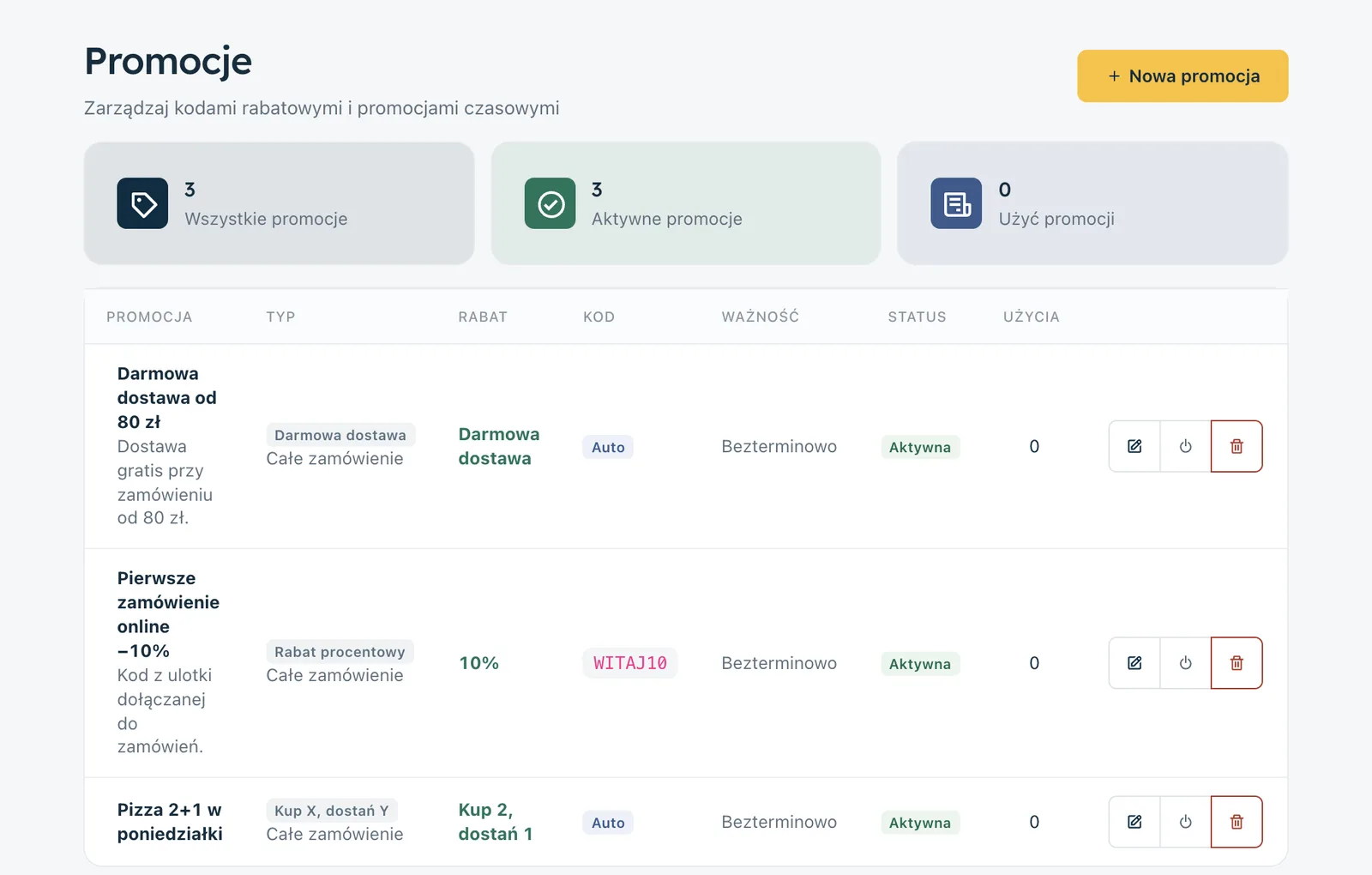
How do promotions work in Ranedo?
Promotions are available in the Plus and Pro plans.
You can create, among other things:
- a percentage discount,
- a fixed-value discount,
- free delivery,
- a free product after a condition is met,
- a “buy X, get Y” promotion,
- meal deals at a promotional price.
A promotion can be applied automatically or require the guest to enter a code.
Conditions and limits
When configuring a promotion, you can define, among other things:
- a minimum order value,
- a maximum discount value,
- a total usage limit,
- a usage limit per customer,
- a validity period from one specific date to another.
This means a promotion does not have to run indefinitely or be available without restrictions.
“Buy X, get Y” promotion
You can configure a mechanic such as 2+1 or another variant based on the number of products.
The system can apply the discount to the appropriate items, for example the cheapest ones. The mechanic can also apply multiple times if the conditions are met, and you can limit the number of applications.
Selected channels
Promotions can be targeted at selected sales channels, such as:
- online orders from the website,
- QR table orders,
- room service in the Pro plan.
Promotions do not work on the waiter screen. If a waiter enters an order directly on their screen, you should not expect a promotion available on the website or QR menu to be applied automatically.
What happens if several promotions match an order?
In Ranedo, one promotion is applied to each order.
If the order meets the conditions of several active campaigns, the system selects the most favourable one for the guest.
This prevents discounts from stacking and makes the final price easier to control.
Meal deals can be available only during selected hours
Promotional meal deals can be used to create an offer available only at specific times.
For example, a lunch deal can be available from 11:00 am to 3:00 pm, while outside that period the regular dishes remain available separately.
This lets you create an offer tailored to a specific time of day without changing prices across the whole menu.
Usage counters help you control promotions
Ranedo keeps track of promotion usage. This lets you see whether a code or campaign is actually being used.
Combined with limits, this allows you to stop a promotion after the planned number of uses has been reached instead of leaving it active without control.
You can send a code to a specific guest segment
In the Plus and Pro plans, the CRM database lets you create guest segments and run email and SMS campaigns.
This means you can prepare a discount code for a specific group and tell them about the promotion without sending the same message to everyone.
For example, instead of a public discount for all guests, you can send a code to people who have not placed an order for some time.
SMS campaigns are charged separately.
A simple framework for a good promotion
Before launching a campaign, go through five steps:
- Choose the goal. Decide whether you want a larger basket, more orders during quiet hours, promotion of a new product or a shift towards your own sales channel.
- Calculate the cost. Check the food cost of the freebie, the value of the discount and any delivery cost.
- Add a condition. Set a minimum order, a specific product, a time window or a code.
- Set limits. Add an expiry date and usage limits.
- Measure the result. After the campaign, check the number of uses, order value and campaign cost.
Do not automatically extend a promotion simply because it was popular. First check whether it achieved its goal and whether the cost was acceptable.
A promotion should change behaviour, not just the price
The most useful promotions exist for a reason. They encourage ordering through a specific channel, a larger basket, choosing a meal deal or buying during hours when the restaurant has spare capacity.
If a discount applies to everyone, all day and to every dish, it becomes increasingly difficult to distinguish it from a normal price reduction.
It is better to use promotions less often, but with a clearly defined purpose and cost.
Try promotions in Ranedo
In Ranedo Plus and Pro, you can create percentage and fixed-value discounts, discount codes, free delivery, free products, “buy X, get Y” promotions and meal deals available during selected hours. You can also set limits, validity periods and the channels where the promotion applies.
See Ranedo plans or create an account and use the free first month with all features included in your selected plan.
Frequently asked questions
Is a percentage discount better than a free product?
It depends on the product costs and the goal of the promotion. A free product with high perceived value for the guest but a low cost to the restaurant may make more sense than a discount on the entire basket.
Can free delivery apply only above a certain order value?
Yes. In the Plus and Pro plans, a free-delivery promotion can be combined with conditions, including a minimum order value.
Can several promotions be applied at the same time?
No. In Ranedo, one promotion is applied to each order. If several match, the system selects the most favourable one for the guest.
Do promotions work on orders taken by a waiter?
No. Promotions do not work on the waiter screen. They are intended, among other things, for website orders and QR menu orders according to the configured channels.
How can I check whether a discount code has been used?
Ranedo tracks promotion usage. You can also set a total usage limit and a per-customer limit, which makes the campaign easier to control.
Share this article: