Management
Online table reservations — fewer calls and less chaos
Online table reservations organize your calendar and cut down on calls. See how to set the rules and handle table reservations without a notebook.
Table reservations can look harmless until the venue gets busy. On a quiet day, a notebook by the register and a phone are enough. The trouble starts when several staff members take reservations, someone jots down a name in a hurry, another person answers the phone in the middle of service, and in the evening it turns out the same table was promised to two groups.
On top of that, there are guests who do not show up, reservations taken through different channels, and no way of knowing whether the person calling has been to the venue before. The more reservations you have, the more you need one place where the whole team can see all the information.
Why a reservation notebook stops being enough
A notebook works well only when everyone uses it the same way. In practice, one person writes the time and name, another adds a phone number, a third jots the party size in the margin.
On Friday at 6:30 PM, the phone rings just as someone is at the register. A reservation for 8:00 PM goes into the notepad quickly, but nobody checks that the same table was already reserved by another shift.
The most common problems are:
- double reservations for the same table,
- no phone number for the guest,
- different rules for taking reservations depending on the employee,
- reservations written down in several places,
- no clear status: pending, confirmed, canceled,
- difficulty checking the history of a specific guest.
Calls usually come in when you have the least time
Guests often call at hours when the venue is already running at full speed. Someone is taking orders, serving dishes or settling a table, and at the same time has to find a free slot and write down a reservation.
Every call like this pulls an employee away from the service in front of them.
An online reservation form does not remove all calls, but it can take over some of the simplest requests. The guest picks the date, time and party size themselves, and the restaurant gets a request to handle.
A reservation form should have clear rules
It is not enough to add a “Reserve a table” button. You also need to decide when and on what terms a reservation can be made.
It is worth setting:
- the minimum lead time,
- how far ahead a reservation can be made,
- the hours when reservations are available,
- the maximum party size for one reservation,
- the typical time a table is occupied,
- rules for larger groups.
Example: if the venue opens at 12:00 PM, there is no point letting a guest choose a reservation for 10:00 AM. Likewise, a reservation for a very large group may need personal contact instead of the form being accepted automatically.
One place for online and phone reservations
The most important thing is that all reservations go into one system.
If the online form works separately and phone reservations still end up only in the notebook, the problem does not go away. The team still has to check two sources.
A better model looks like this:
- the guest makes a reservation online or calls,
- staff enter the phone reservation into the same system,
- all reservations are visible together,
- a reservation can be assigned to a specific table,
- the status changes as the visit is handled.
Confirming a reservation reduces uncertainty on both sides
After making a reservation, the guest should know whether the slot has been accepted and confirmed.
The simplest model is an e-mail message once the restaurant confirms. That way the guest has a record of the time, party size and reservation status.
It also helps the staff. Instead of relying on a phone call from several days ago, both sides have concrete information.
Assign the reservation to a table before service starts
An entry in the calendar is not enough if, at the door, you still have to figure out where to seat the guests.
Assigning a table in advance helps you judge:
- how many seats are actually still available,
- whether you are trying to reserve the same table twice,
- whether a larger group needs tables pushed together,
- how busy the dining room is at a given hour.
Example: at 7:00 PM you have three reservations of four people each. The number of reservations alone says little. Only when you assign them to the floor plan do you see which tables stay free for walk-in guests.
No-shows: a system will not solve everything automatically
Guests who reserve a table and do not come are a problem, especially with a small dining room or larger groups.
There is no single method that removes no-shows completely. You can, however, reduce the risk through how you organize things.
A reminder call the day before
For larger groups, it is worth confirming the visit by hand the day before. A short call lets you check that the party size has not changed and that the reservation is still valid.
A manual waiting list
If you are fully booked, you can keep your own list of people interested in a table that frees up. When someone cancels, staff contact the next person.
It does not have to be a complicated system. It can be a simple list kept by the manager.
A policy for large groups
For larger reservations, it is worth having clear rules on confirmation, changing the party size and the cancellation deadline.
How should you treat a guest who did not show up?
It is not worth basing a decision on a single case. Someone may have forgotten, had car trouble or faced an emergency.
History is far more useful. If you see that the same guest repeatedly reserves a table and does not come, you can apply an extra manual confirmation for their next reservation.
The “no-show” status helps tell this situation apart from a reservation the guest canceled earlier.
Reservations should build knowledge about guests
If a reservation includes contact details, it is not worth treating them as one-off information written on a slip of paper.
After a few visits, you may want to know:
- whether the guest has been there before,
- how often they visit the venue,
- whether they usually reserve for two people or more,
- whether they are a regular guest,
- whether they have been no-shows before.
This does not mean every visit has to be used for marketing right away. Consent to marketing communication is a separate matter. Visit history alone, however, can help staff recognize a regular guest.
If you want to build repeat visits more broadly, also see the article on the loyalty program in a restaurant.
What should happen once the guests arrive?
A reservation does not end when it is confirmed. It should move through further statuses.
A practical process can look like this:
- the reservation is pending confirmation,
- the restaurant confirms it,
- the guests arrive,
- staff mark that they have taken the table,
- once the visit is over, the reservation is completed.
If the guests do not show up, you mark the reservation as a no-show. If they cancel in advance, as canceled.
That way the calendar shows not only the plan for the future but also how visits actually went.
A reservation can connect with table service
If the restaurant uses QR codes assigned to tables, reservations and the floor plan can work together.
Example: a guest has a reservation for 6:00 PM. The table is prepared and assigned to the visit. At the right moment it can be opened for service, so that orders from the QR code go to the right table.
You can read more about this way of taking orders in the article on ordering through a QR code at the table.
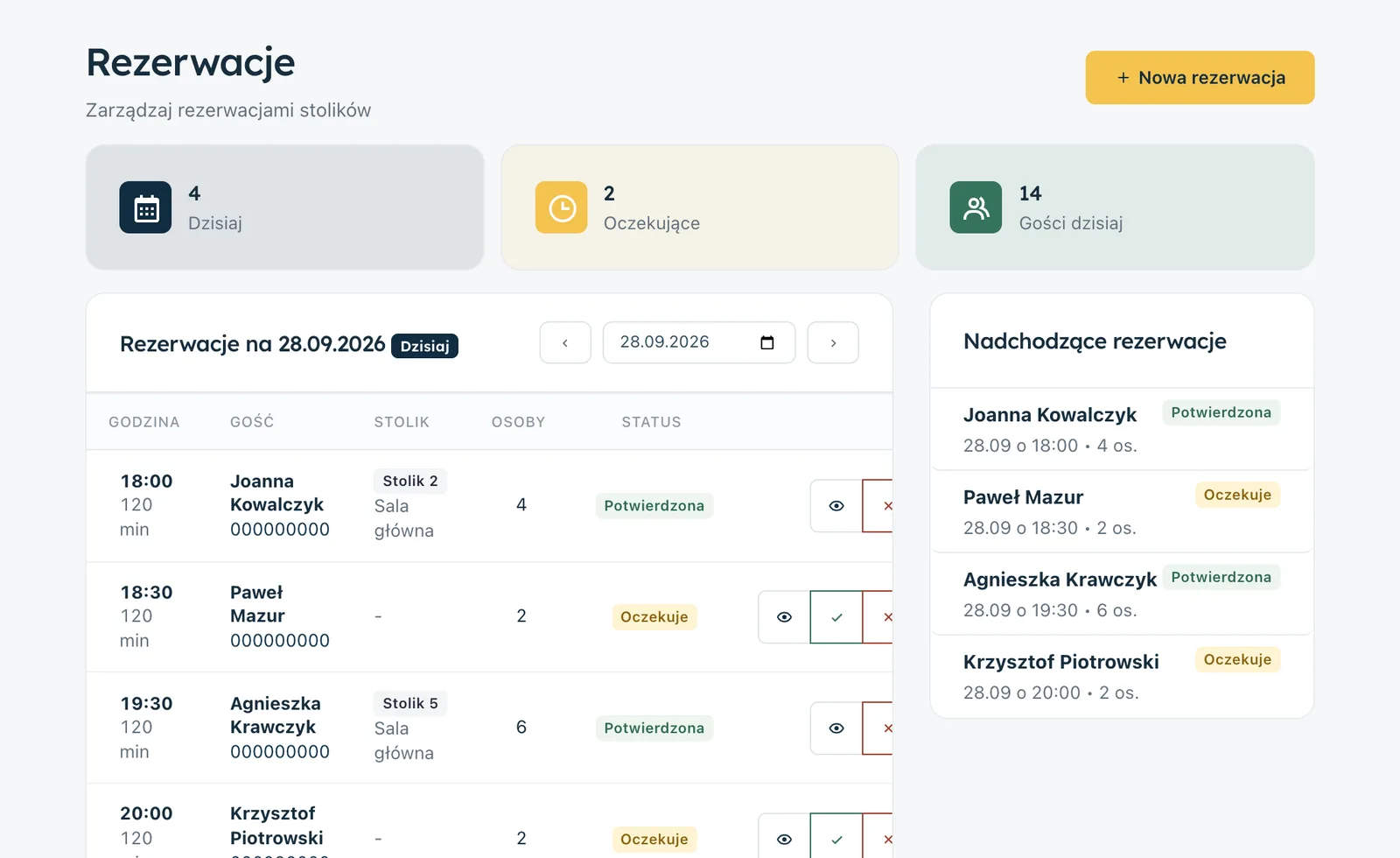
How do reservations work in Ranedo?
Table reservations are available in the Plus and Pro plans.
On your restaurant's website, you can offer a form through which the guest submits a reservation themselves.
In Ranedo, an online reservation:
- must be made at least 60 minutes ahead,
- can be for a date up to 180 days ahead,
- is available during the venue's opening hours,
- can be for 1 to 20 guests.
The system rejects a duplicate of the same reservation, so accidentally submitting the form several times does not create several identical entries.
A new reservation goes to your staff
When a new reservation is made, the restaurant can get an e-mail notification.
Staff check the date and can then confirm the reservation. Once confirmed, the guest receives an e-mail. Optionally, SMS can also be used, though SMS messages are paid separately.
Phone reservations go to the same place too
If a guest calls or walks in, staff can enter the reservation into Ranedo by hand.
As you enter the details, the system can suggest an existing guest from the CRM database. That way you do not have to create a new person every time if the customer has already used the restaurant before.
The system can also warn you about a duplicate and about an attempt to assign a reservation to a table that is already taken.
Floor plan and reservation statuses
A reservation can be assigned to a specific table on the floor plan.
The system has these statuses:
- pending,
- confirmed,
- guests at the table,
- completed,
- no-show,
- canceled.
That way staff know whether a reservation still needs action, whether the guests have already arrived and whether the visit has ended.
The table opens before the reservation
In Ranedo, a table linked to a reservation can open 30 minutes before the planned time.
This matters if you use QR orders. When the table is active, orders from the QR code assigned to it can go through according to your service rules.
That way the reservation system, the floor plan and table orders do not work as three separate processes.
Every guest goes into the CRM database
A person added through a reservation goes into the CRM guest database available on the Plus and Pro plans.
That way, later reservations are not anonymous entries in a calendar. You can see the visit history and other information available on the guest's profile.
If the guest agrees to marketing communication, the CRM can later also be used in e-mail or SMS campaigns. Reservation data alone should not automatically be treated as marketing consent.
How do you roll out online reservations without complicating your work?
- Set the rules for hours and party size.
- Add the reservation form to your website.
- Stop keeping a separate notebook for some of the reservations.
- Enter phone reservations into the same system too.
- Assign tables ahead of time.
- Confirm reservations before the visit.
- For larger groups, consider a manual phone call the day before.
- Once guests arrive, mark the status “guests at the table”.
- Mark a no-show as “no-show” instead of deleting the entry.
- Regularly check the reservation history of regular guests.
One list matters more than the form itself
The biggest benefit is not just that a guest can click “reserve” on your website. It is that online, phone and in-person reservations are visible in one place and tied to the floor plan.
Then the person starting a shift does not have to ask whether anyone else took a reservation by phone, or check several slips of paper.
The form cuts the number of simple calls, and a shared system reduces chaos on the team's side.
Try table reservations in Ranedo
Online reservations, the floor plan and the CRM guest database are available on the Plus and Pro plans. You can take requests from your website, add phone reservations by hand, assign tables and track the visit status in one place.
Check the plans or Ranedo plans or create an account and use the first month free, with all the features of the plan you choose.
Frequently asked questions
Does Ranedo send an automatic reminder before a reservation?
No. Ranedo does not send automatic reminders before a visit. For larger groups, you can use a manual confirmation call the day before.
Can I enter a reservation taken by phone into the system?
Yes. On the Plus and Pro plans, staff can add a phone or in-person reservation by hand to the same list as online reservations.
Can I assign a reservation to a specific table?
Yes. A reservation can be linked to a table on the floor plan, and the system warns you if the chosen table is already taken.
Does Ranedo handle deposits for reservations?
No. The system does not handle deposits or prepayments for reservations. If you want to use that model, you need to set it up separately.
Does a guest from a reservation go into the CRM?
Yes. Guests from reservations go into the CRM database on the Plus and Pro plans, so later visits can be tied to the history of a specific person.