Technology
Ordering by QR from the table — when it makes sense in a restaurant
QR ordering from the table shortens the path to the next order. See how to set it up and which venues it makes the most sense for.
In a cafe, bistro, pub, or outdoor dining area, the problem often doesn't start in the kitchen but when placing the order. A guest takes a table but has to go to the bar and stand in line. In another venue, they wait until a waiter notices them. For the first order, they usually accept this. For the second, things look different.
If someone wants to order another coffee, a dessert, or the next beer, they have to get up again or get the staff's attention. Some people will do it. Others will decide they don't want to wait anymore. QR ordering from the table can remove exactly this step, but only if it is well connected with the work of the floor, the kitchen, and the pass.
Where does the problem with lines and waiting for service come from?
Picture a Saturday afternoon in a cafe with a garden. A few people stand at the bar. One is choosing a cake, another is paying, a third is asking about the ingredients of a drink. At the same time, guests at a table would like to order two more coffees.
Technically, the venue is able to sell more products. The problem is the path from the guest's decision to the order being taken.
A similar situation can occur in:
- a pub where further orders are placed at the bar,
- a bistro with partial self-service,
- a garden where the waiter has to keep coming out of the venue,
- a cafe where one person prepares drinks and takes orders at the same time,
- a venue with many tables and a small floor team.
So the problem isn't only that the guest waits. At peak times, a line can tie up staff at exactly the moments they're needed to serve ready dishes, handle payments, or clear tables.
The second order is easier to lose than the first
A guest usually wants to place the first order, because that's why they came to the venue. The second is more prone to friction.
Example: two people have finished lunch and are thinking about dessert. If the waiter shows up at the right moment, they can order right away. If they have to wait a dozen minutes or go back to a crowded bar, they may simply ask for the check.
This doesn't mean a QR code will automatically increase sales. But it can shorten the path between the decision “I'd order something else” and sending the order.
This is an important difference. QR shouldn't be treated only as a digital menu. It can be an additional channel for placing orders directly from the table.
QR menu and QR ordering are two different things
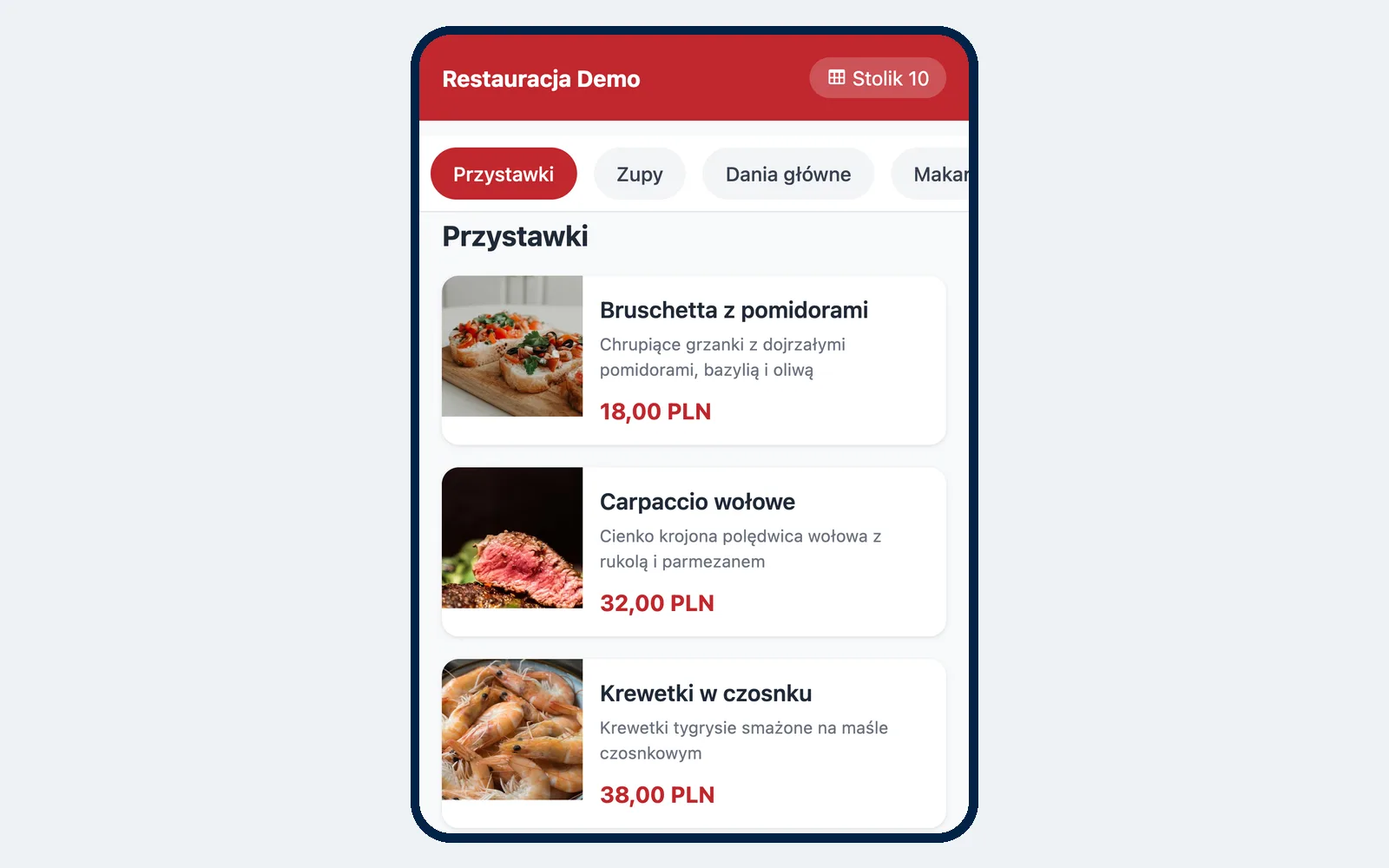
In many restaurants, a QR code simply opens the menu. The guest scans the code and can read the offer on the phone. Once they've picked a dish, they still have to call the waiter or go to the bar.
This is a QR menu for browsing.
The second model goes one step further. The guest:
- scans the code assigned to the table,
- opens the menu,
- chooses dishes, variants, and add-ons,
- places the order from the phone,
- the order reaches the staff as an order from a specific table.
This is a QR ordering from the table.
The organizational difference is big. In the first model, the phone replaces the paper menu. In the second, it also takes over part of the order-taking process.
QR shouldn't mean no service
One of the common mistakes is thinking that once QR is in place, the waiter becomes unnecessary. In practice, it's mostly part of their work that changes.
The guest can send the order themselves, but someone still has to:
- prepare the table,
- answer questions about the menu,
- bring the dishes or drinks,
- respond to the guest's additional needs,
- serve people who don't want to use a phone,
- deal with unusual situations.
So QR works best as an additional option, not as a barrier between the restaurant and the guest.
How to plan handling QR orders?
Before you put the code on the tables, decide what exactly happens after the guest presses the order button.
Who sees the new order?
It's not enough for the order to be “in the system”. Someone has to know it has just come in.
In a smaller venue, one person running the floor can be responsible for this. In a larger one, the order can be passed to the right waiter and to the kitchen.
Most importantly, QR orders shouldn't create a separate, forgotten queue.
Who delivers the order?
You can adopt several models. In a cafe, the staff can bring the drink to the table. In a more self-service venue, the guest can pick up the order at a set spot.
The model has to be clear to the guest. If they order from the table and then don't know whether to wait or go pick it up, you're just moving the problem from one stage to another.
What does payment look like?
Depending on the service model you choose, the guest can pay:
- in cash,
- by card at the table, if the venue offers it,
- online when placing the order.
It's worth setting one default scenario and clearly communicating the other options. Especially for the next order, convenient payment can matter a lot.
Which venues does QR ordering work best for?
Not every restaurant model needs this kind of solution. It makes the most sense where guests place several shorter orders during one visit, or where taking the order itself often creates a bottleneck.
Good examples are:
- cafes,
- bistros,
- pubs and bars,
- outdoor dining areas,
- food halls and venues with self-service elements,
- restaurants where guests often order extra drinks, desserts, or sides.
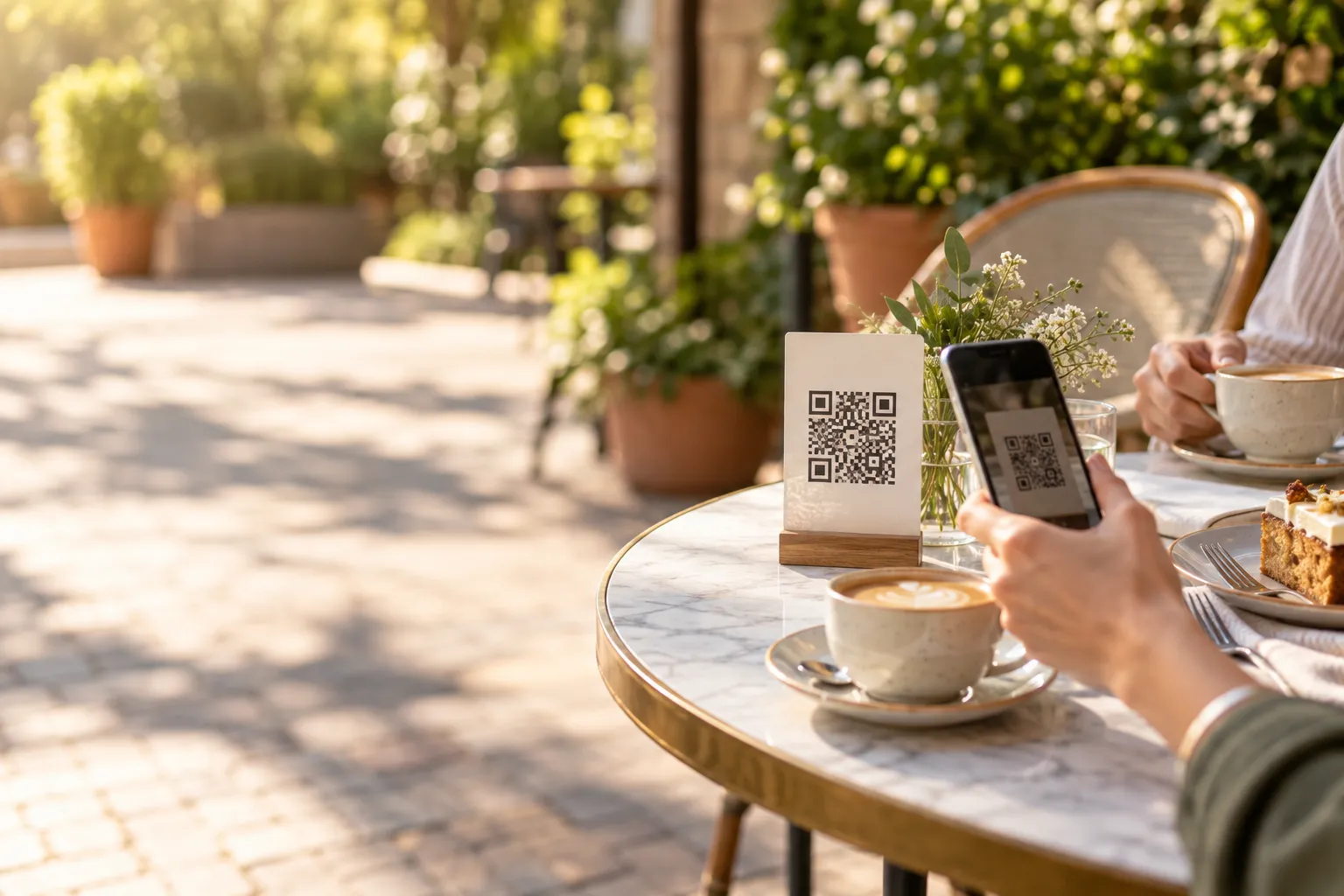
Example: in a garden with a dozen or so tables, a guest doesn't need to look for a waiter just to order another lemonade. They scan the code on the table and send the order.
Where can classic waiter service be better?
In restaurants built around full service, waiter recommendations, and the guest experience, QR doesn't have to be the main way of ordering.
This applies especially to fine dining venues, where the waiter:
- tells guests about the dishes,
- recommends items,
- helps choose the order of courses,
- guides the service through the whole evening.
Even there, QR can play a supporting role, but fully replacing the conversation with the staff doesn't always fit the character of the venue.
If your main goal is to improve the waiter's traditional work, you can also read the article about the waiter screen on a phone instead of a notepad.
What about older guests and people who don't want to scan a code?
QR ordering shouldn't be the only method available.
If an older guest doesn't use a smartphone or simply prefers to talk to a waiter, they should still be able to place an order with the staff.
The simplest rule is:
QR gives an additional option, but doesn't take away traditional service.
This way, a person who wants to order quickly from their phone can do so, and someone who prefers classic service doesn't feel excluded.
Can someone take a photo of the code and order later from home?
This is a reasonable concern. A static QR code can be photographed. If the system unconditionally accepted every order tied to that code, someone could try to place an order assigned to a table after already leaving the venue.
That's why a table-ordering solution should take into account the current state of the table, not just the code itself.
One possible safeguard is that an order for a closed table isn't automatically treated the same as an order from a person actually sitting in the venue. Depending on the configuration, it may require staff confirmation, or the table may not accept orders at all when it's closed.
Doesn't QR take away contact with the guest?
It can, if the venue treats it as a way to pull service off the floor entirely. It doesn't have to be that way.
Used well, QR mainly removes the wait for a simple task. A guest doesn't need a conversation with a waiter every time they want to add a water or another coffee.
This lets staff give more attention to the situations where contact really matters: recommending a dish, solving a problem, greeting guests, or checking that everything is fine.
So it's worth planning a service standard regardless of technology. A waiter can still stop by the table after serving the meal, ask about additional needs, and be visible on the floor.
A call-staff button can complement QR
If a guest orders on their own from the phone, it's good to also give them a simple way to contact the staff.
They may need to:
- ask a question,
- ask for the check,
- report a problem with the order,
- order something the traditional way.
A “Call staff” button doesn't replace the waiter's presence, but it can reduce situations where a guest spends several minutes trying to catch the eye of someone on the team.
Set separate rules for table orders
You don't always want to accept QR orders on exactly the same terms as delivery or pickup orders.
It is worth defining:
- what hours table orders can be placed,
- whether a minimum order value applies,
- how many orders the system can accept in a given time,
- how to behave at the moment of the heaviest kitchen load.
Example: if on Friday at 8:00 PM the kitchen is working at full capacity, continuing to accept a large number of orders without control can only deepen the delays. An order limit in the QR channel can help match the number of new orders to what the venue can handle.
How does QR ordering work in Ranedo?
In Ranedo, ordering with a QR code from the table is available on the plans Plus and Pro plans. It isn't available on the Start plan.
You can prepare a separate QR code for each table and download it for printing as a PNG file. The guest scans the code with their own phone and uses the menu in the browser. They don't have to install an app or create an account.
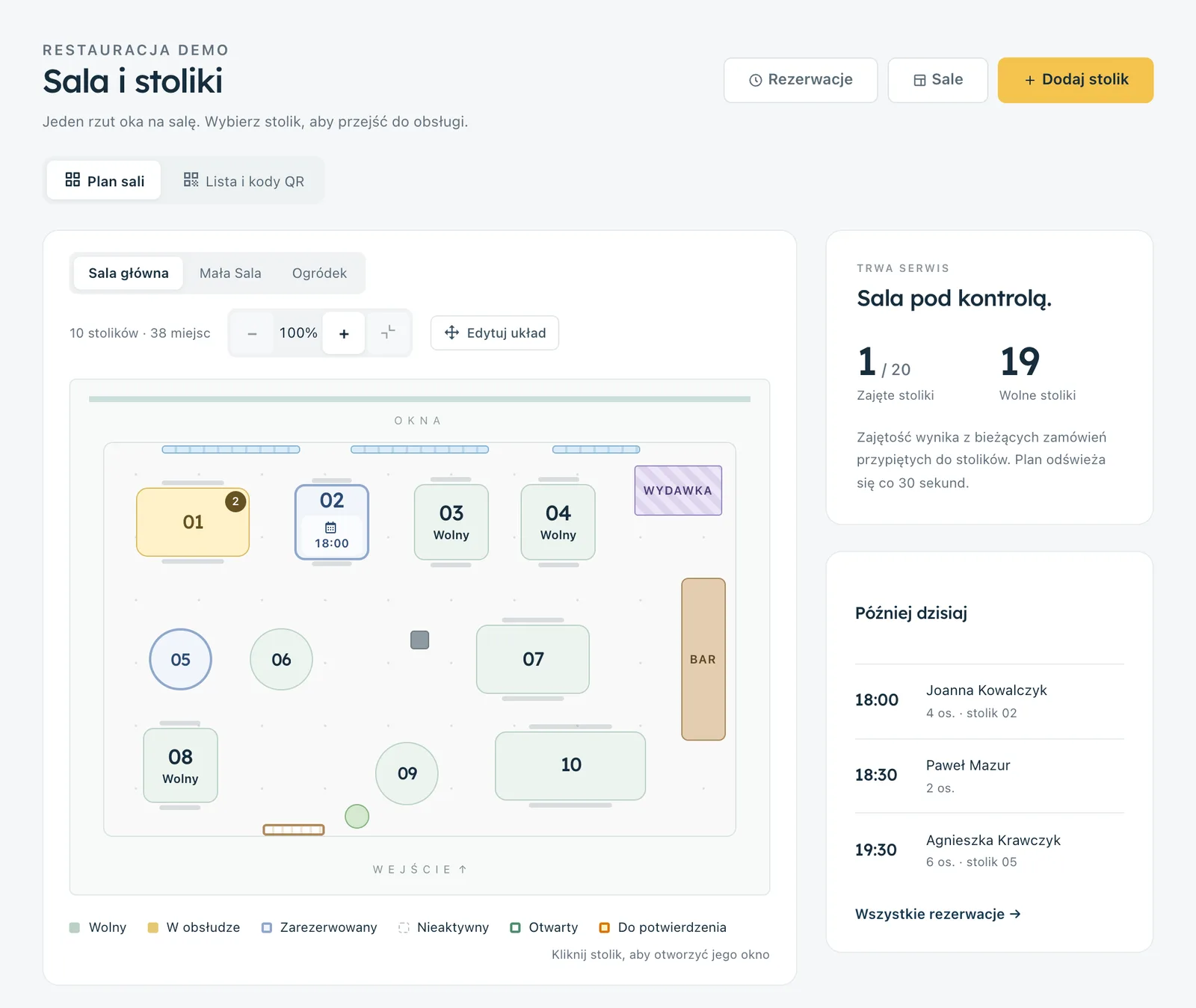
The order is assigned to a specific table, so the staff know where to bring the prepared dish or drink.
Payment for a QR order
Depending on the configuration, the venue can accept at the table:
- cash,
- card at the table,
- online payment.
You can also offer the option to add a tip.
Promotions work with QR too
For table orders, the promotion features available on the Plus and Pro plans can apply, including discount codes, bundles, and free products from the promotions you set up.
This way you don't have to create separate promotion rules just because the order came from a QR code.
How does Ranedo protect against orders from an old photo of the code?
The code alone doesn't automatically mean the table is active. The table's status is tied to floor service.
A table can be opened by the staff, with a current order, or in connection with a booking. For a booking, it can be available from 30 minutes before the scheduled time.
If someone tries to use an old photo of the code for a closed table, then depending on the settings, such an order can wait for staff confirmation, or the closed table may not accept orders.
This doesn't remove the need to keep an eye on the floor, but it reduces the risk that a photo of the code alone is enough to send an order to the kitchen unconditionally.
What happens to the order after the QR scan?
The most important thing is that the QR channel doesn't work as a separate island.
Orders can go to the staff and to the kitchen screen. On the Plus and Pro plans, the KDS shows orders in the queue together with other orders the venue is handling.
This way the kitchen doesn't need a separate tablet just for QR, and the waiter doesn't need to check an extra app.
If you want to see how to organize the kitchen queue itself, also read the article on the KDS kitchen screen instead of paper tickets.
How to roll out QR without annoying guests?
The safest way is to do it in stages.
- Decide whether QR is only for the menu or also for placing orders.
- Define who reacts to a new order and who delivers it.
- Decide which payment methods you offer.
- Put the code in a spot that's easy to scan.
- Write a simple instruction next to it, for example “Scan to see the menu and order”.
- Leave the option of ordering the classic way with the staff.
- Test an order on several different phones.
- Check how the system behaves after a table is closed.
- Test an additional order to a table that already has an open check.
- Train the staff so they can help someone who doesn't know how to use QR.
After rollout, mainly watch how guests behave. If most still call the waiter, the cause may be a code that's hard to see, an unclear instruction, or simply the character of your venue.
QR should shorten the path to an order, not turn the restaurant into a vending machine
The biggest advantage of ordering from the table isn't the QR code itself. It's the ability to place an order exactly when the guest feels like it.
In a cafe, it might be a second coffee. In a pub, another beer. In a bistro, a dessert after lunch. The guest doesn't have to wait for a moment when a staff member is free.
At the same time, classic service can stay available. This way, technology supports the staff instead of forcing one way of using the venue on every guest.
Try QR ordering in Ranedo
QR orders from tables, the floor plan, the waiter screen, and the kitchen screen are available on the Plus and Pro plans of Ranedo. The guest orders from their own phone without installing an app and without creating an account, and the order is assigned to a specific table.
Check the plans or Ranedo plans or create an account and use the first month free, with all the features of the plan you choose.
Frequently asked questions
Does the guest have to install an app to order via QR?
No. In Ranedo, the guest scans the code and places the order in the phone's browser. They don't have to install an app or create an account.
Can a QR code be used only to display the menu?
Such solutions exist, but a QR menu alone is not the same as ordering from the table. In Ranedo, on the Plus and Pro plans, the table code also lets the guest place an order tied to a specific table.
What about people who don't want to use QR?
They should still be able to place an order with the staff. QR is best treated as an additional channel, not a mandatory way of ordering for every guest.
Can someone order from a photo of the code after leaving the restaurant?
Ranedo takes the table's status into account. An order from an old code assigned to a closed table may require staff confirmation, or the closed table may not accept such orders, depending on the settings.
Do QR orders go to the kitchen?
Yes. On the Plus and Pro plans, table orders can go to the KDS kitchen screen and to the staff together with the venue's other orders.