A phone by the oven
A guest dictates a pizza with no onions, extra cheese and a different sauce. Someone writes it down in a hurry, and a few minutes later the cook reads the shorthand their own way.
For pizzerias
It is Friday evening, the oven is running at full capacity and the phone rings every few minutes. Ranedo Restauracja gives your pizzeria its own page with online orders, pickup and delivery on your terms, and a single queue for the kitchen.

Everyday life at your venue
A guest dictates a pizza with no onions, extra cheese and a different sauce. Someone writes it down in a hurry, and a few minutes later the cook reads the shorthand their own way.
Some of the calls aren't new orders, just questions about whether the pizza is on its way. Every such question pulls someone away from work.
At peak time you accept more orders than the oven and drivers can handle. A delay on one order pushes back all the following ones.
How Ranedo helps
01 / Online orders
A guest opens your pizzeria's website, picks a pizza, a size and toppings, adds notes and chooses pickup or delivery. It all happens in the browser on a phone or computer, with no app to install. Variants and extras are tied to a specific pizza, so "no onions, extra cheese" goes into the order exactly as the guest chose it, not as a note from a phone call.
On the website the guest sees current prices, photos and allergens, because you manage the menu in the system, not in a separate file. They pay online through Tpay to your Tpay account, or in cash on pickup if you leave that option on. You can also take orders for a later time, for example for an evening with friends.
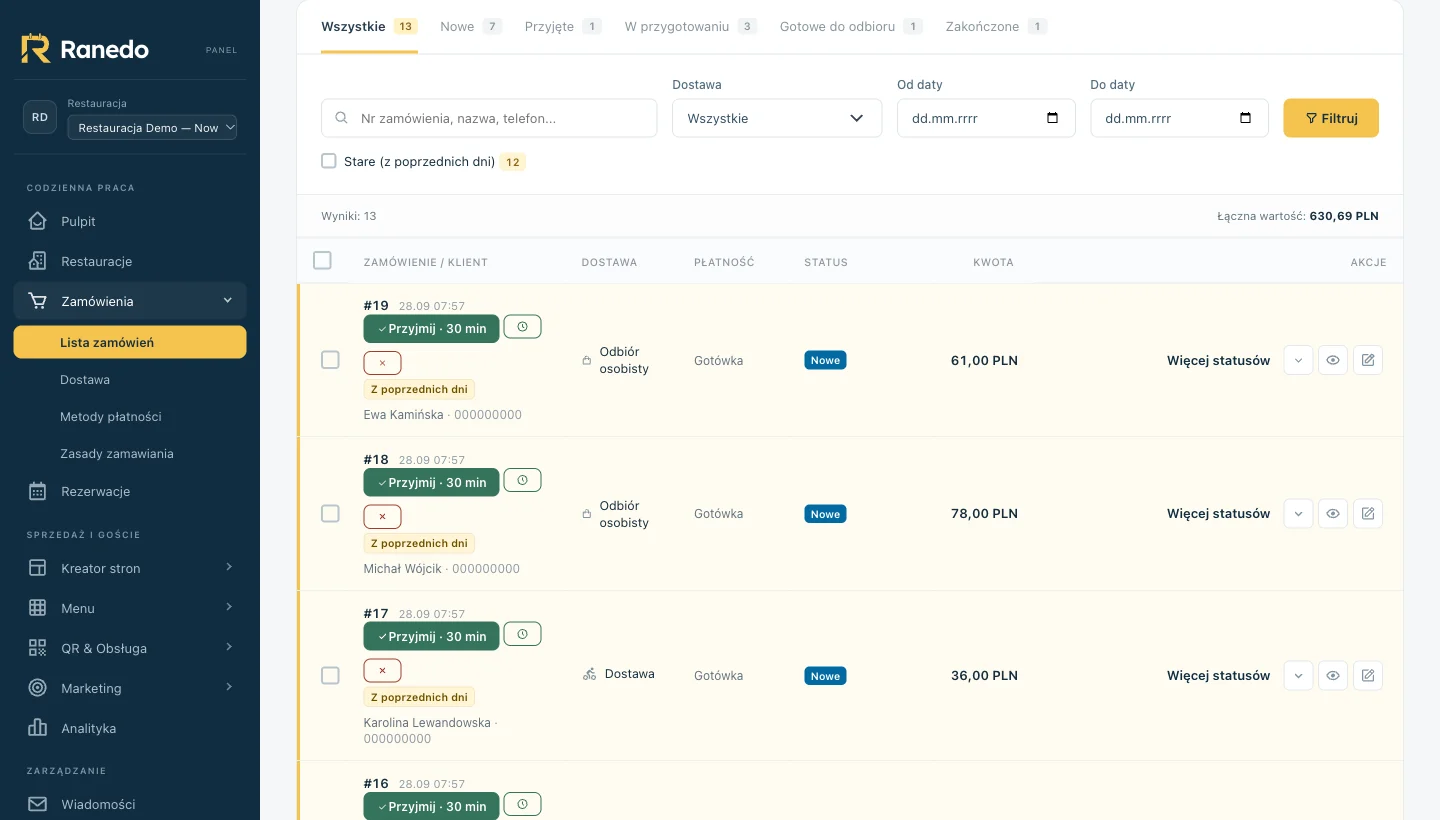
After placing the order, the guest gets a confirmation by e-mail or SMS, with a link to track the status. Some of the "is it on its way yet" questions disappear, because the guest checks it themselves. Your team learns about a new order from a push notification on a phone or computer. You can still answer the phone, but it doesn't have to be the only way to order.
Your own orders instead of portal commission: you pay a subscription for your plan and give up no commission on the orders themselves: the fee applies only to online payments through Tpay. You can keep the portals where they bring you new guests and send regulars to your own site.

02 / Kitchen
The kitchen display gathers orders from the website, the dining room and QR codes in one queue: new, in preparation and ready. The oldest are at the top, and each shows its source and the guest's notes. Instead of shuffling tickets, the cook changes the status with one tap, and the rest of the team sees what is ready to hand out or to pack for the driver.
If pizza is made in one part of the kitchen and salads, starters or drinks in another, you assign dish categories to stations. Each station sees only its own items and marks them as ready separately. Orders for a later time wait for the right moment to start preparing, so a pizza for 8:00 PM doesn't go into the oven at 6:00 PM.
When the dough or an ingredient runs out, the kitchen marks the item as unavailable and it disappears from ordering in the supported channels. The kitchen display runs on a tablet that you link to your account with a pairing code. The device has access only to the kitchen display, with no settings or billing, and you can revoke its access at any time. The kitchen display depends on your plan.
In practice
03 / Delivery
You know where a driver can get to in a reasonable time and where they can't. In Ranedo you define zones by a radius from the pizzeria, draw your own boundaries on a map or enter postal codes and their prefixes. For each zone you set a separate delivery fee, a minimum order value and a fulfillment time.
The guest enters an address and immediately sees the terms for their area. If the address is outside the zones, an order with delivery is blocked by default, and the guest can choose pickup. You don't have to explain over the phone why you don't deliver to the other side of town or why the minimum is higher. When zones on the map overlap, the system picks the lowest fee.
An hourly order limit protects the oven and drivers at peak time. You set order-taking hours separately for pickup and delivery. Ranedo sets the delivery terms at the time of the order, but doesn't assign a courier: you organize the drivers and the delivery itself. Delivery zones with their own prices are on all plans.

04 / Returns
A guest who ordered once on your website comes back to the same address and sees your name, photos and menu. You build the website on a ready-made template, for example Forno Rosso, prepared for pizzerias and Italian kitchens, and replace the sample content with your own photos and descriptions. You can add the website address or a QR code to flyers, boxes and social media profiles.
Promotions help you plan the quieter days. You can set a discount code with an expiry date and a minimum order, free delivery above a threshold or a "buy X, get Y" promotion applied automatically. Usage limits and a maximum discount amount keep the cost of a campaign in check. When several promotions match, the system picks the one that is best for the guest.
In sales reports you check the number of orders, the average value, the most popular pizzas and the hourly distribution for the last 7 or 30 days. This helps you plan purchasing and staffing for the next weekend. The report shows order data, not profit: you account for the cost of products and delivery separately. Promotions depend on your plan, reports are on all plans.
In practice
A day with Ranedo Restauracja
You check the report for the last 7 days: which pizzas sell best and when the peak is.
A pickup order scheduled for 6:00 PM waits in the queue for the right moment.
Push on your phone: a new delivery order to the Downtown zone, paid online.
A guest from outside the delivery zones chooses pickup instead of calling with a question.
The buffalo mozzarella runs out. The kitchen turns off the pizza from ordering.
A guest checks the status through the link in the confirmation, instead of calling the pizzeria.
How to start
Create an account and add your menu: pizzas with sizes, toppings and allergens. You can also send us your menu and we will set it up for you at no charge.
Set up pickup and delivery: zones with a fee and a minimum amount, order hours and online payments.
Share the link to your orders on your site and on social media. On the Pro plan, turn on the kitchen screen for the oven.
The first 30 days are free, with all the features of the plan you choose and no card required.
Related: Online ordering for restaurants from your own site · Delivery zones and the minimum order
Questions
Your question isn't answered here? Write to us, and someone who knows the product will reply.
Ask a question →Yes. You turn on the channels that suit your pizzeria. You can start with pickup, and turn on delivery after you've prepared zones, fees and the organization of deliveries.
We charge no commission on the orders themselves. The fee applies only to online payments: from 1.09% on the Pro plan to 1.98% on the Start plan, plus PLN 0.39 per payment. Orders paid in cash or on pickup carry no fee at all. You also pay the subscription for your plan.
No. The system sets the delivery terms at the time of the order: the zone, fee, minimum and time. You organize the drivers and the delivery itself.
Yes, if you leave cash on pickup. Only Tpay handles online payments (BLIK, fast bank transfers, cards), and they require connecting your Tpay account. For online payments Ranedo charges a fee that depends on the plan (1.09% on the Pro plan to 1.98% on the Start plan, plus PLN 0.39 per payment), and orders paid in cash or on pickup carry no fee at all.
No. You can set zones by postal codes or their prefixes. With postal codes, the most precise prefix takes priority.
The Start plan costs PLN 79 net per month and covers one venue and up to 79 orders a month. The Plus (PLN 179) and Pro (PLN 299) plans have no order limit. The first 30 days are free.
Try it free for 30 days and add your menu, or send us your menu and information about your venue, and we'll prepare the starting configuration for free. The first 30 days are free, no card required.
Other types of venues
Start free of charge
The first 30 days are free, no card required.


