Orders taken over the phone
Address, apartment number, extras, payment method. Everything has to be written down during the call, then read back from a hasty note.
For venues with delivery and pickup
Most of your orders do not end at the table but in a bag: takeout or delivery. Ranedo Restauracja gives you your own online ordering channel, delivery zones with separate terms and a single queue for the kitchen.

Everyday life at your venue
Address, apartment number, extras, payment method. Everything has to be written down during the call, then read back from a hasty note.
A guest asks whether you deliver to their neighborhood and how much it costs. You answer by hand every time, and everyone gets a slightly different answer.
You accept everything that comes in, then drivers leave late and phone calls asking about the status start all over again.
How Ranedo helps
01 / Your own channel
Your own online sales give your venue a permanent place where you send guests from search engines, social media, flyers and packaging. The guest sees your name, photos and menu, and places the next order at the same address. You build the ordering website on a ready-made template, on a Ranedo subdomain or on your own domain.
In one place the guest finds dishes, variants, extras, allergen information and a cart. They choose pickup or delivery, can order for a later time and pay online through Tpay to your Tpay account, or in cash on pickup. Ordering happens in the browser, with no app to install.
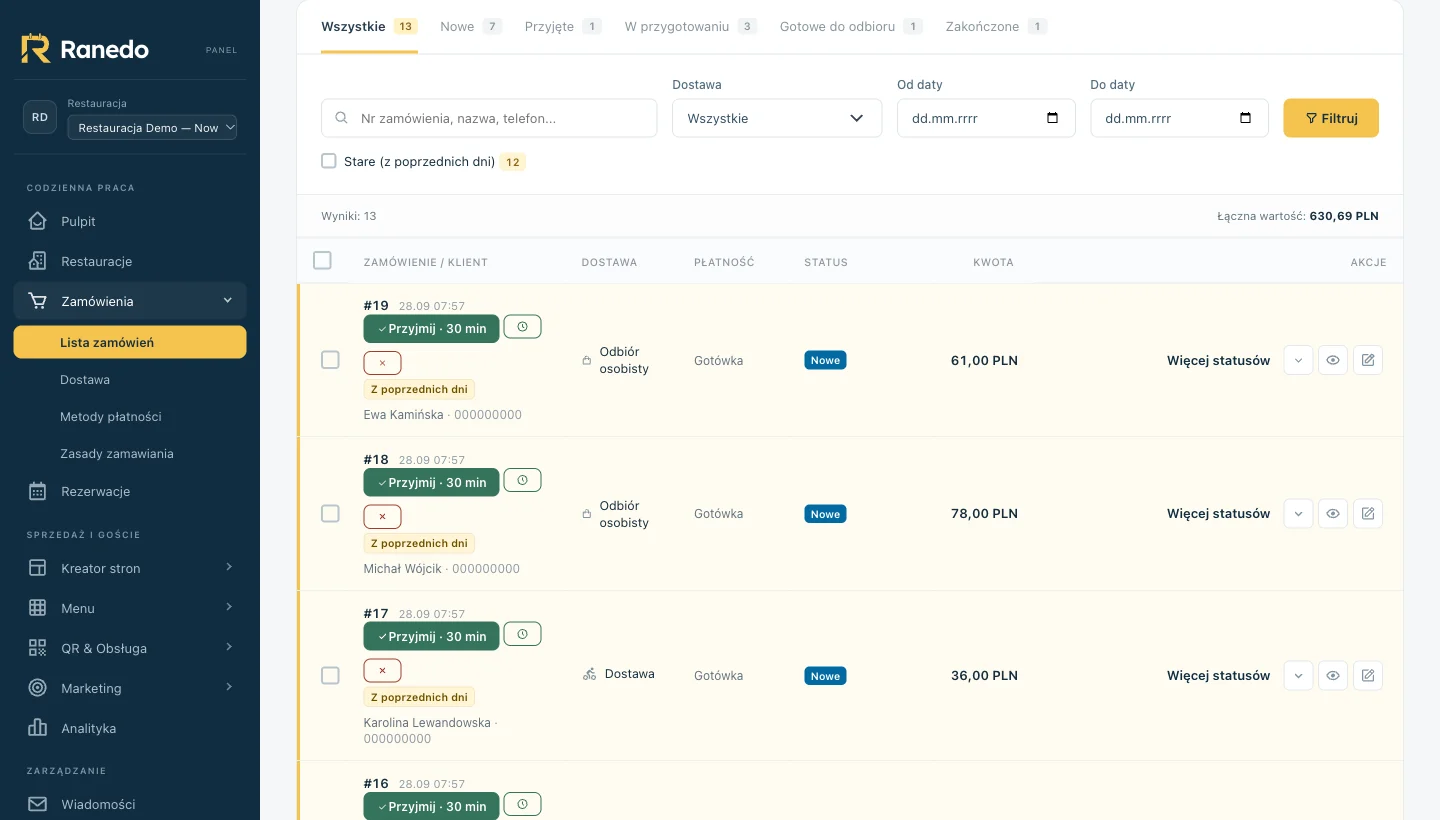
An order with the selected dishes and notes goes to the restaurant dashboard. Your team works from the saved details instead of reconstructing them from a phone call. On plans with an order limit, once you exceed the limit you keep taking orders without interruption, and the subscription changes only from the next period, after an e-mail beforehand.

02 / Zones
Not every district has to cost the same. You define a zone by a radius from your venue, draw your own boundaries on a map or set it up by postal codes and their prefixes. For each zone you assign a delivery fee, a minimum order value and a fulfillment time. Closer addresses can have different terms than farther ones.
The guest learns the terms after entering their address, before buying. If the address is outside the delivery area, an order with delivery is blocked by default, and the guest can choose pickup. When the address recognition service is temporarily unavailable, the system can use a default fee and flag the address for your team to check manually.
With overlapping zones on the map, the system picks the lowest fee, and with postal codes the most precise prefix takes priority. Before publishing, check addresses in the center, on zone borders and outside the area. Ranedo sets the delivery terms, while you organize the drivers and the delivery itself.
In practice
03 / Pace
You set order-taking hours separately for each channel, so pickup can start earlier than delivery. An hourly order limit and the fulfillment time protect your kitchen and drivers at peak time. Instead of accepting everything and then explaining delays, you decide in advance how many orders your team can handle.
Your team learns about new orders from push notifications on a phone and computer. E-mail and SMS notifications are also available for new orders and for orders left without a response. SMS messages are not included in the subscription: you buy them in packs in the dashboard, and guest confirmations also use credits from the pack.
On the kitchen display, orders from the website go into one queue: new, in preparation and ready. Orders for later wait for the right moment to start preparing. The kitchen marks individual items as ready and turns off a dish that ran out, and an order with all items ready moves on. The kitchen display depends on your plan.

04 / The next order
After placing an order, the guest gets a confirmation by e-mail, or by SMS if they don't give an address. The message contains a link to track the order status. Some phone calls asking "when will it be ready" simply disappear, because the guest checks it themselves. Meanwhile, you can focus on handing out orders.
You can set promotions so they don't eat into your margin. Free delivery above a threshold, a discount code with an expiry date and a usage limit, an automatic promotion or a set with its own price on selected days and hours. Abandoned cart reminders help guests who didn't finish their order to come back to it. Promotions and reminders depend on your plan.
In sales reports you compare ordering channels and check the most popular dishes and the busiest hours over the last 7 or 30 days. In the order list you set filters and export data to CSV. Keep in mind that the report shows order data, not profit after the cost of products and delivery.
In practice
A day with Ranedo Restauracja
You turn on pickup orders. Delivery starts at 11:30, according to the hours you set.
Push: a delivery order to the Surroundings zone, with the minimum met and paid online.
The hourly order limit has been reached. Next guests choose a later fulfillment time.
A guest from outside the delivery zones sees a message and chooses pickup.
The kitchen turns off a dish that ran out. It disappears from the menu on the website.
You check in the report which hours were the busiest, to set the drivers' schedule.
How to start
Create an account and add your menu.
Set up pickup, delivery and payments.
Share the link to your orders.
The first 30 days are free, with all the features of the plan you choose and no card required.
Questions
Your question isn't answered here? Write to us, and someone who knows the product will reply.
Ask a question →Yes. You set the fulfillment methods according to your venue's offer. You don't have to launch delivery to accept online orders.
Yes. You set the minimum, fee and fulfillment time separately for each zone.
No. Ranedo sets the delivery terms at the time of the order. The restaurant organizes the drivers and the delivery itself.
You keep taking orders without interruption. From the next period your subscription moves to a higher plan, and you get an e-mail beforehand and can opt out.
SMS messages are not included in the subscription. You buy them in packs in the dashboard: 1 credit is 1 SMS. Create an account: the first 30 days are free, no card required.
Other types of venues
Start free of charge
The first 30 days are free, no card required.


