Technology
Online payments in a restaurant: how to choose a provider
Online payments in a restaurant: BLIK, cards, commissions, payouts, and refunds. How to compare providers; Ranedo Restauracja works with Tpay.
Online payments have become a natural part of delivery and pickup orders. For the guest, convenience matters most: they want to pay with BLIK, a card, or a quick transfer and get an order confirmation right away. For the restaurant, choosing a provider is more complex, because you need to look not only at the commission but also at how funds are paid out, refunds, company verification, and handling problems.
In Poland, popular payment providers include Tpay, Przelewy24, and PayU (this is a market overview: Ranedo Restauracja integrates with Tpay only). Don't choose based on a single number from a price list. Terms can change, and with higher turnover you can often ask for an individual offer.
Don't compare providers by commission alone
The transaction commission matters, but it is not always the most important thing. A difference in the rate can matter less than problems with payouts, hard-to-handle refunds, or a missing convenient payment method for your guests.
When choosing a provider, check the whole process:
- how much a single transaction costs,
- whether there are fixed fees,
- which payment methods are available,
- how quickly funds reach the restaurant's account,
- how refunds are made,
- how account setup works,
- whether a test mode is available,
- how support works when there is a problem.
Always check current rates directly in the provider's price list. If you take many orders online, it is also worth asking whether the terms can be negotiated.
1. Commission and additional fees
The most obvious cost is the commission charged on payments. But don't assume that a single number describes all the costs of working together.
Before signing the contract, check:
- whether the commission is a percentage, a fixed amount, or a combination of both,
- whether the terms differ depending on the payment method,
- whether there is an activation or subscription fee,
- whether there are extra costs for refunds,
- whether payouts cost extra,
- whether promotional terms apply only for a limited time.
Example: suppose one offer has a lower transaction commission but charges an extra fee for certain operations. Another has a higher base rate but a simpler price list. Only after calculating with your own number of orders and average transaction value can you tell which option is better.
2. BLIK, cards, and quick transfers
The provider should support the methods your guests actually want to use. For orders placed on a phone, it is especially important to be able to finish the payment quickly without retyping a lot of data.
Check the availability of:
- BLIK,
- payment cards,
- quick bank transfers,
- other methods offered by the provider, if they matter for your group of guests.
The point is not to offer as many payment methods as possible. It is more important that the basic methods work well on a smartphone and don't cause problems at the end of the order process.
If a guest picks dishes, enters an address, and only at the last step discovers they can't pay with their preferred method, they may abandon the order. You can find more about such problems in the article on improving the online ordering process.
3. Payout time
The guest pays the provider, but from the restaurant's point of view what matters is when the money shows up in its bank account.
Before choosing a provider, ask:
- how often payouts are made,
- whether you can change the payout schedule,
- whether there is a minimum payout amount,
- how weekends and days off are handled,
- whether payouts are automatic.
This matters especially when a large share of sales goes through online payments. A restaurant regularly pays for supplies, wages, and day-to-day operations, so predictable cash flow is important.
4. Refunds should be simple for your staff
A payment refund may be needed when the restaurant can't fulfill an order, when the guest and the venue agree to cancel, or in another situation that requires returning money.
It is worth checking the whole process in advance, instead of learning it only during a problem on a Friday evening.
Ask the provider:
- how to start a refund,
- whether a partial refund is possible,
- how long a refund takes to process,
- whether a refund comes with an extra cost,
- what happens to the commission on the original payment,
- where you can check the refund status.
What to do with a canceled order?
First make sure the payment was actually collected. Then make the refund according to the provider's procedure and tell the guest that it has been started.
Don't promise a specific time when the money will appear in their account if you don't control that process. Posting time can depend on the provider, the bank, and the payment method used.
5. Test mode and checking the integration
It is best to test payments before you open sales to guests. The provider may offer a test environment, often called a sandbox, where you can check the integration without making a real payment.
It is worth testing, among other things:
- a successful payment,
- an interrupted payment,
- a rejected transaction,
- the guest's return to the restaurant's site,
- correct matching of the payment to the order,
- the refund process.
The mere fact that the provider account is active doesn't mean the whole order process works correctly. The test should cover the path from adding a dish to the cart to the payment confirmation.
6. Documents and restaurant verification
The payment provider must verify the company before it enables full transaction processing. The scope of required information can depend on the provider, the legal form of the business, and its current procedures.
Before you start the integration, check which documents you will need. You may be asked for information about, among other things:
- company details,
- people authorized to represent the company,
- the bank account,
- the website and terms and conditions,
- the nature of the business.
Don't leave this to the day you plan to launch orders. Verification may require completing data or correcting information on your site.
7. The provider's customer support matters only when something breaks
During normal operation you will probably rarely contact the provider. The problem appears when some payments stop working, a transaction has an unclear status, or you need to clarify a refund.
Before signing the contract, check:
- which channels you can use to report a problem,
- what hours support is available,
- whether technical documentation is available,
- where you can check service status,
- how to report a problem with a specific transaction.
If you take most of your online orders in the evenings and on weekends, check especially carefully how help is available during those hours.
Table: what to check before choosing a payment provider
| Criterion | What to look at | Question for the provider |
|---|---|---|
| Commission | Percentage commission, fixed fees, additional costs | What will be the total cost of handling my typical transactions? |
| BLIK | Availability and how it works on a phone | Is BLIK available in the standard offer? |
| Cards | Supported card types and the mobile payment flow | What does paying by card on a smartphone look like? |
| Quick transfers | List of supported banks and how convenient the process is | Which banks are currently supported? |
| Payouts | Frequency and rules for transferring funds | When does the money from transactions reach my account? |
| Refunds | Full and partial refunds, costs, status | How do I make a refund, and does it come with an extra fee? |
| Test mode | Ability to check the integration before launch | Do you offer a sandbox or another test environment? |
| Verification | Documents and requirements for the website | What do I need to prepare to enable payments? |
| Support | Contact channels and availability of help | How do I report an urgent payment problem? |
| Individual offer | Possibility of negotiating at higher turnover | From what turnover level can you offer individual terms? |
Is it still worth allowing cash on pickup?
Paying online doesn't mean you have to give up cash completely. Some guests may still prefer to pay on pickup or delivery.
Cash has a few advantages:
- it doesn't require going through a payment provider,
- every guest understands it,
- it can be an alternative when an online payment has a problem.
But it also has a significant drawback: the restaurant starts preparing food without having received the money first.
The risk of uncollected orders
With an online payment, an uncollected order is still an operational problem, but the restaurant has a confirmed payment. With cash, the full cost of the prepared food may remain with you.
To limit the risk, you can set your own rules, for example:
- require online payment for larger orders,
- confirm unusually large orders by phone,
- watch for repeated problematic orders,
- state the pickup time and method clearly.
But don't complicate the process for all guests because of isolated cases. First check whether the problem of uncollected orders really occurs in your venue.
Payment should not be a separate organizational problem
From the guest's point of view, payment is just one of the last steps of the order. They shouldn't have to wonder whether the restaurant received the money or whether they need to send a transfer confirmation.
The ordering system should receive the information from the provider and link it to the specific order. This way your staff sees the right status instead of manually comparing the list of payments with the list of orders.
How do payments work in Ranedo?
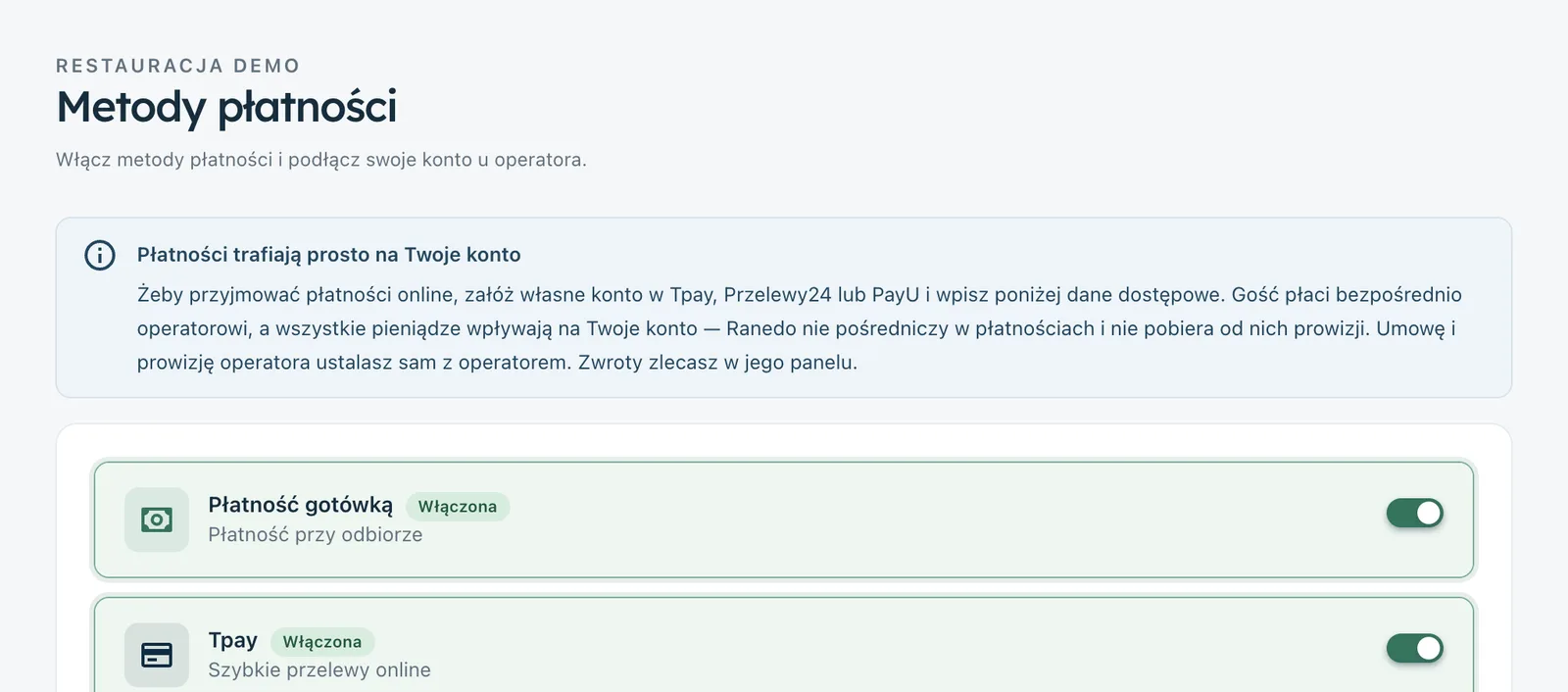
In all Ranedo plans, a restaurant can accept cash on pickup and online payments through Tpay (BLIK, fast bank transfers, and cards). Ranedo Restauracja integrates with Tpay only; we describe Przelewy24 and PayU in this article only as other options available on the market.
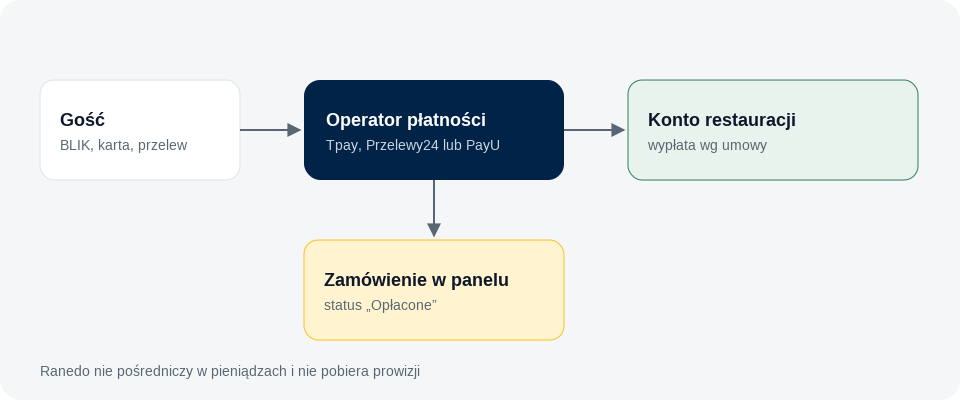
The restaurant signs the agreement with the provider. The guest pays the provider, and the money goes to the restaurant's account under the terms agreed with Tpay. Ranedo also charges a plan-dependent fee on online payments: from 1.09% to 1.98% plus PLN 0.39 per payment. Cash on pickup is not subject to it.
In the settings you can test the connection with the provider and use test mode. This lets you check that the integration works correctly before you start taking real orders.
If an order is canceled and a refund is needed, in Ranedo you can start the refund from the specific order. The payment process itself is then carried out by the provider.
You can find more about online sales features in the section online orders in Ranedo.
Your own payments help you keep control of the order
If you run your own sales channel, the agreement with the payment provider belongs directly to your restaurant. You can compare offers and negotiate terms depending on your turnover.
This differs from a model where all sales go through an external intermediary portal. You can find more about this difference in the article on portal commissions and your own online orders.
This doesn't mean you must always give up intermediaries. The point is to know the cost of each channel and consciously decide which orders you want to route through your own site.
How to choose a provider in practice?
Before deciding, prepare a simple list of requirements. For most small venues it might look like this:
- Check that the provider supports the BLIK, cards, and quick transfers you need.
- Compare current price lists and all additional fees.
- Ask how often funds are paid out.
- Check the procedure for full and partial refunds.
- Find out which documents are required for verification.
- Check whether you can test the integration before launch.
- Test a payment on a phone.
- Check how available support is during the hours when the restaurant takes the most orders.
- If you have higher turnover, ask about individual terms.
Only after such a comparison, choose an offer. The lowest commission in the price list headline doesn't have to mean the best solution for your venue.
Check online payments together with orders
The Tpay integration, as well as cash on pickup, is available in all Ranedo plans. You can check the available plans or create an account and use the first month free, with all the features of the plan you choose.
Frequently asked questions
Which payment provider is the cheapest?
There is no single answer that is current for every venue. Providers' price lists and promotions can change, so compare the current terms of the providers. In Ranedo Restauracja the Tpay terms apply, because it is the only integrated provider. With higher turnover it is also worth asking for an individual offer.
Is it worth offering online payment and cash at the same time?
It can make sense if some of your guests still prefer cash. But you need to account for the higher risk of an order not being picked up when the restaurant has not been paid in advance.
What happens to the money when paying through Ranedo?
The guest pays through Tpay, and the funds go to the restaurant's account under the agreement with Tpay.
Can I test payments before I start taking orders?
Yes. Ranedo lets you test the connection and work in test mode, so you can check the configuration before you start accepting real payments.
How do I refund a canceled order?
In Ranedo you can start a refund from the order. The refund is then processed by the payment provider under its own rules and timelines.